Complete Guide 2026 🇮🇳
ABHA Card: How to Create, Download, and Use Your ABHA
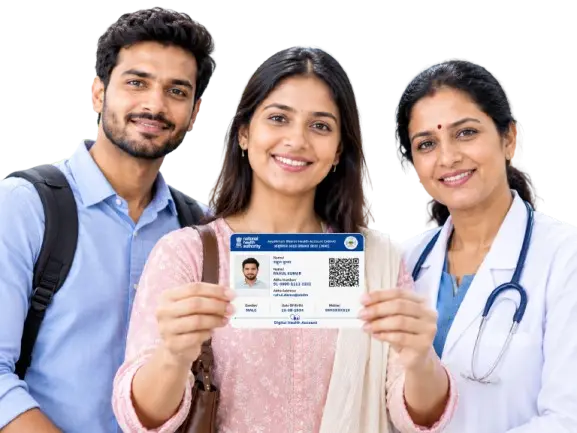
How Does the ABHA Card Give You a Digital Health Identity? ABHA is a health ID card issued by India’s Ayushman Bharat Digital Mission to access, store, and share medical records digitally. It is a 14-digit health identifier ID that gives an individual identity that can be used within India’s digital healthcare ecosystem.
ABHA stands for Ayushman Bharat Health Account. The Ayushman Bharat Health Account card manages health information and saves lab reports, prescriptions, and diagnoses digitally to eliminate physical files. Allows users to give or take away doctor access to their health history.
✓ Free & Voluntary
✓ 14-Digit Health ID
✓ Records On Consent
The Number
What Is an ABHA Number?
What Is an ABHA Number?
The ABHA Number is a free 14-digit unique identifier assigned to an individual voluntary link with your digital health account. Official ABDM information describes it as used to link, digitally store, access, and share health records across hospitals and doctors in India.
It was launched by the Government of India under the Ayushman Bharat Digital Mission (ABDM) to build a unified digital healthcare system. It helps support healthcare services to identify your account and connect relevant health information when you choose to use those services.
The Address
What Is an ABHA Address?
What Is an ABHA Address?
An ABHA address is a unique, user-friendly, self-declared identifier associated with an ABHA number. It can make it easier to identify and access an ABHA account than relying only on the 14-digit number, though both work together.
The official ABHA application also supports creating an easy-to-remember ABHA address. During ABHA creation, the available process may provide suggested ABHA addresses, while eligible users may also be able to create an address of their choice.
Difference
ABHA Number vs. ABHA Address
| ABHA Number | ABHA Address |
|---|---|
| 14-digit unique health identifier | Easier-to-remember digital address |
| Used to identify the ABHA account | Can be used to access or identify the account |
| Generated as part of ABHA creation | Can be created and linked with the ABHA number |
| Important for digital health services A 14-digit sequence like 70-7463-2446-5247 | Useful for easier account interaction It looks like an email address (for example, yourname@abdm). |
Step by Step
How to Create an ABHA Card Online
You can create your ABHA card in minutes using your Aadhaar number and mobile phone. Just follow these six simple steps on the official portal.
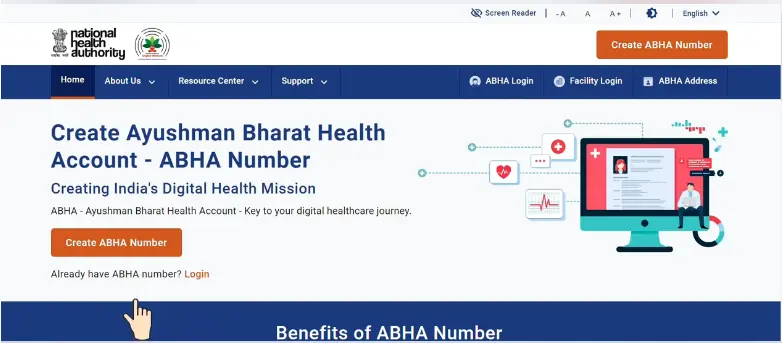
2
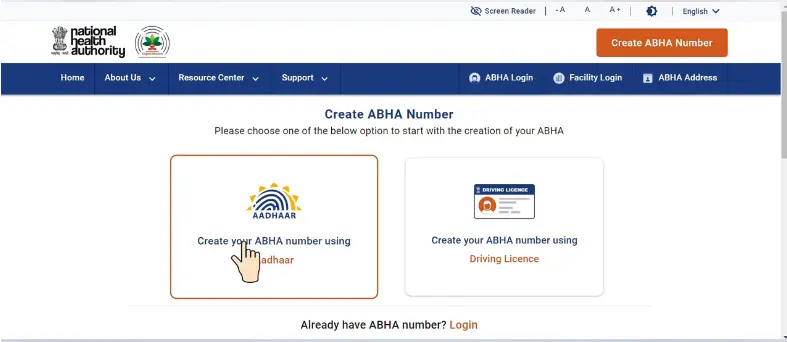
Select Creation Method:
Choose the Aadhaar-based creation option if available. Click on “Create ABHA Number” and choose to register using your Aadhaar card or driving license.
3
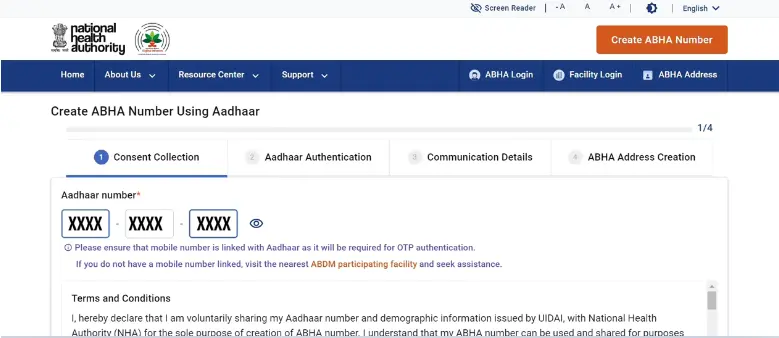
Enter your Identification Number:
Type your 12-digit Aadhaar number or selected ID number.
4
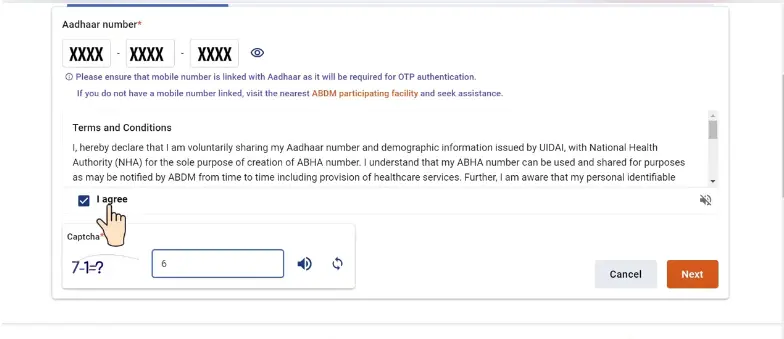
Select the terms:
Provide the required consent and accept the applicable terms.
5
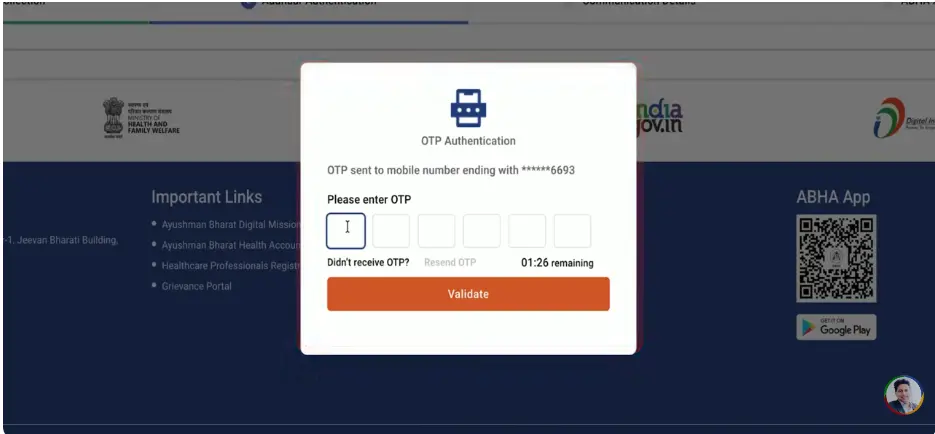
Verify OTP:
Keep access to your Aadhaar-linked mobile phone available if you are using Aadhaar-based authentication. Complete verification by entering the one-time OTP sent to your registered mobile number. The OTP is an important part of the verification process.
6
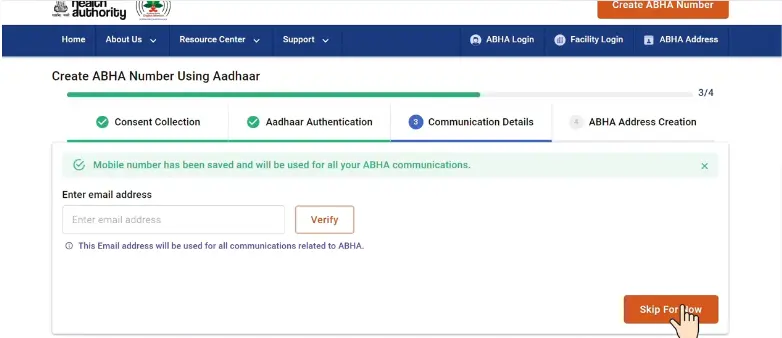
Provide Communication Details:
Enter and verify the communication details and alternate mobile number or email address for updates.
7
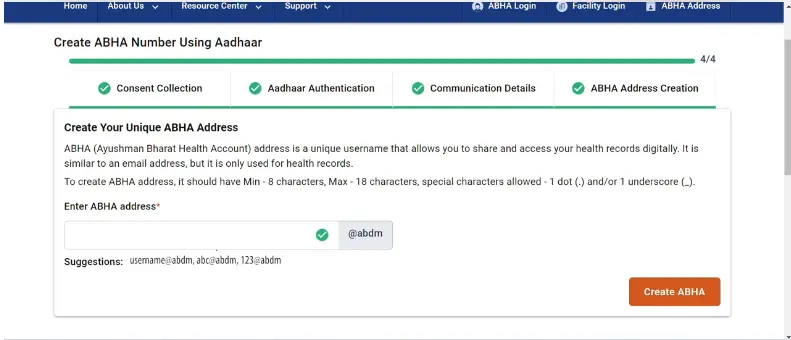
Create ABHA Address:
Create or select an available ABHA address, where applicable, or create a personalized one.
8
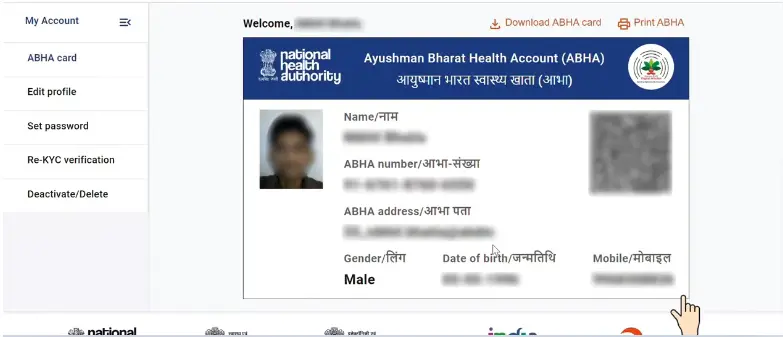
Download Card:
After submitting your details, check the status to generate your 14-digit ABHA number and then download the ABHA card in PDF format.
Access the Details
Once the process is completed, access your ABHA details and digital card. Official ABDM material confirms an Aadhaar-based ABHA creation flow that includes Aadhaar authentication, mobile verification, and ABHA address creation.
DOWNLOADING STEPS
How to Download Your ABHA Card If You Already Have One
If you already have an ABHA number, then you do not need to register again to get a copy of your card. To use the official ABHA services, download your ABHA card using your existing account.
Follow these simple steps:
1
Open the official ABHA portal:
Visit the official website and choose the available login, recovery, or ABHA access option.
2
Access your existing account:
You can log in using the identifications such as your registered mobile number or ABHA address, depending on the option shown on the official portal.
1
Solve the Captcha:
The beneficiary solves the captcha and clicks on NEXT.
4
Complete verification:
Type the OTP to confirm or other verification details requested by the portal.
5
Check your ABHA details:
Once you open the account, review your ABHA number and other account information. If several profiles are linked to the same mobile number, you will see them listed and can pick the right one.
6
Download your card:
Use the available download option to save your ABHA card in a PDF format for future use.
ABHA App
How to Access Your ABHA Through the App
The official ABHA app can be used to access your existing ABHA account and manage the supported services from your phone.
After accessing your existing account, the app can help you:
For an Aadhaar-based process
For an Aadhaar-based process
The features available can depend on the current app version, participating healthcare provider, and the digital services supported by that facility. Therefore, not every hospital or healthcare service will necessarily offer the same ABHA features.
Requirements
What Do You Need to Create an ABHA Card?
The exact information requested can depend on the method you use for ABHA card registration.
For an Aadhaar-based creation process, you may need these things:
For an Aadhaar-based process
Some ABHA registration options can also use mobile or email-based authentication. The official ABHA privacy policy describes self-registration using mobile OTP and email OTP authentication.
No Aadhaar?
Can You Create an ABHA Card Without Aadhaar?
Aadhaar is one of the supported ways to create/apply and verify an ABHA, but it is not the Health ID without an Aadhaar number by using an alternative government-issued identification document like a driving license.
Aadhaar is one of the supported ways to create/apply and verify an ABHA, but it is not the Health ID without an Aadhaar number by using an alternative government-issued identification document like a driving license. But the available options can depend on the registration channel and verification method.
Some other documents
Driving License
Use your driving license number with your name, date of birth, and gender to complete self-registration on the ABHA official portal.
Other Methods
Person registration is possible by participating in a hospital or visiting an authorized healthcare facility if you cannot use online options.
What If Your Mobile Number Is Not Linked to Aadhaar?
Aadhaar-based ABHA creation generally requires access to the mobile number used for OTP verification. If your mobile number is no longer available, the portal advises visiting the nearest ABDM participating facility for help.
In this situation, check the other alternative registration option, such as the driving license route, if you have one.
Common Uses
What Is the ABHA Card Used For?
The main purpose of an Ayushman Bharat Health Account card is connected to digital health identity and health information management. Depending on the services and healthcare providers involved, ABHA can help support:
ABHA can help support
Important note on insurance
The Digital Health ID is an information manager, not a health insurance policy or a free financial coverage card. if you are eligible You can link it to insurance policies or government programs like AB-PMJAY.
The official ABHA app describes functionality for viewing health records and linking and sharing them through the ABDM network after user consent.
Working
How Does ABHA Work?
ABHA works as an identifier or as an account that participates in healthcare facilities across India to streamline registration and follow-up care. It’s not within a federated digital system, and it’s not a single database that keeps your medical files.
The ABHA number identifies a person and threads their health records only with their informed agreement across multiple systems and contributers.
ABHA serves as an essential that lets these systems link a record to your digital identity and exchange that record using ABDM registries and consent managers when you approve it.
Beneficiary health records are stored in taking part Health Information Providers (HIPs), diagnostic labs, hospitals, and digital health apps, not under cover of the ABHA number itself.
ABHA enables consent-based linking, access, and sharing of health. It records across ABDM-enabled systems, rather than storing those records on its own.
How It Works
How Does ABHA Help With Digital Health Records?
Assume that you have visited different healthcare providers over a number of years. Your reports’ strength as paper documents, PDFs, or records held by different facilities.
Connecting your records
Endorsed by ABHA, it can help connect relevant digital health records to your health identity. This can make it easier to access your information when you need it.
However, an ABHA number does not automatically mean that every medical record you have ever created will appear in one place. Records need to be generated, linked, or shared through participating systems and according to the applicable consent process.
Consent & Privacy
ABHA and Consent: Who Can Access Your Health Records?
Under the Ayushman Bharat Digital Mission (ABDM), health information is sensitive, so consent is an important part of the ABDM framework. Only you and the healthcare providers can access your health records through an ABHA account.
The ABHA application officially states that every individual can link and share health records through the ABDM network after user consent. This means an ABHA should not be viewed simply as a card that gives anyone automatic access to your medical history.
When using a digital health service, pay attention to:
Always use official or trusted healthcare platforms when entering personal information.
Consent & Privacy
What Information Do You Share When Creating an ABHA?
Creating an ABHA does not mean that every healthcare provider automatically receives access to your medical history. Health-record access and sharing are handled through the applicable ABDM services and consent process.
Before creating an ABHA through Aadhaar-based authentication, review the consent information shown on the official portal. The registration process may ask you to provide identification and basic demographic details needed to create and verify your ABHA.
The information requested can include:
The information and consent requirements shown on the official portal can change as the service is updated, so read the consent notice carefully before selecting I Agree.
Benefits
ABHA Card Benefits
The benefits of an Ayushman Bharat Health Account card are mainly related to digital health identity and record management.
A Digital Health Identity
Your 14-digit ABHA number provides a unique identity for accessing the healthcare ecosystem.
Easier Health Record Management
Link all healthcare lab reports and prescriptions to one place, which removes the need to carry physical copies of reports while visiting a doctor. Supported health records can be linked to your ABHA and accessed through compatible digital health services. It also precludes the loss of health reports, as the reports can be saved digitally and accessed and tracked anytime, anywhere.
Safe sharing
Share your health history with verified doctors only when you give your digital approval.
Digital Access to Health Information
The ABHA application provides individuals with a longitudinal view of their health records, with options to link and share their health history after consent.
Less Dependence on Paper Records
Digital access can reduce the need to carry every report and X-ray films physically, particularly when records are available through connected healthcare systems.
Centralized records
Save all your doctor prescriptions, lab reports, and treatment histories in only one digital space across India.
Convenient Identification
An ABHA number and ABHA address can make interaction with participating digital health services much easier. Through the ABHA apps, patients can avoid the long queues by getting medical facilities. Using a scan of a QR code, the patients can generate OPD tokens and avoid standing in long queues for doctor consultation.
Remember, these benefits depend on the healthcare service, facility, and digital systems involved. ABHA is intended to support digital health services, not replace every existing healthcare process.
Uses
Where Can You Actually Use Your ABHA Card?
An ABHA number is useful when you are visiting if it is actually part of the ABDM network at participating public and private hospitals, clinics, and diagnostic labs across India that are registered under the Ayushman Bharat Digital Mission (ABDM) portal.
Common Confusion
Is the ABHA Card the Same as the Ayushman Bharat Card?
The Ayushman Bharat card and ABHA and the health assurance scheme are not the same; they both serve completely different purposes in the healthcare system.
| Feature | ABHA Card | Ayushman Bharat PM-JAY |
|---|---|---|
| Purpose | It serves as a digital health identity | Government health assurance scheme, enabling free treatment at hospital |
| Eligibility | Available for all Indian citizens | Designed for economically weaker persons under PM-JAY with an annual income up to 5 lakhs. |
| Benefits | Helps with digital medical records | Provides eligible healthcare expenses under scheme rules |
| Cost | Free to create | Free only for eligible applicants |
| Administering framework | Part of the Ayushman Bharat Digital Mission | Administered under the PM-JAY framework |
Optout, deactivate,or delete
How to Opt Out, Deactivate, or Delete Your ABHA
ABHA is a voluntary digital health identity, so creating one does not mean you must use it for every healthcare service.
If you no longer want to use your ABHA, check the account-management options available through the official ABHA portal or app. In the portal you may find settings related to managing, deactivating, or deleting your ABHA.
Open the official ABHA service, review the account-management options available for your account, and complete any verification the service requires.
Using these steps to deactivate or delete ABHA
What Happens When You Opt Out
Final Takeaway
Final Takeaway
An ABHA Card is more than a digital health identity that supports the management and sharing of your health details.
Key points to remember
An ABHA Card is more than a digital health identity that supports the management and sharing of your health details.
The beneficiary can create an ABHA through official ABDM services, use your 14-digit ABHA number to identify your account, create an ABHA address, and access supported health records with the appropriate consent.
Most importantly, keep ABHA separate from Ayushman Bharat PM-JAY in your mind. ABHA is a digital health identity, while PM-JAY is a separate health assurance scheme with its own eligibility and benefits.
If you are creating an ABHA for the first time, use the official ABDM platform and carefully check every verification and consent step before submitting your personal information.
Frequently Asked Questions
ABHA Card FAQ
Answers to the most common questions about the ABHA card.